Home › InterviewSarthi: product facts
Apply Sarthi finds jobs and applies to them for you. Prep Sarthi runs spoken mock interviews. Live Sarthi gives answer suggestions during permitted interview calls on Windows. Meeting Sarthi helps in client meetings.
The InterviewSarthi homepage introduces four products: Apply Sarthi for applying to jobs automatically, Prep Sarthi for AI mock interviews, Live Sarthi for help during interview calls and Meeting Sarthi for client meetings. Choose the product for the task you need. Prices below are for India; paid passes do not renew automatically. Google API quotas and any provider charges are separate.
For job seekers who want applications sent for them. A Windows app: it finds jobs that fit your CV on Naukri, LinkedIn, Indeed, Shine, Foundit and company career pages, fills each application and sends it. The free job lists can be browsed on a phone or computer.
| Product and app | How Apply works · Browse public jobs · Get the Windows app |
|---|---|
| Price | Free every week: 20 applications in the first week, then 15 every week. Plans, paid once for 30 days: Basic ₹249 (up to 300 applications a month), Pro ₹499 (up to 1,000), Max ₹799 (up to 2,000). The public job lists are free. |
| Account | No sign-in for public job browsing. Sign in for personal CV matching, documents and application tracking. |
| AI setup | The app uses your own free Google Gemini key; Google quotas and charges apply separately. Browsing the job lists needs no key. |
| Application control | Choose "fill and send" (the default) or "fill only, I press Submit". You handle "are you human" checks and any question only you can answer. |
| Data and limits | CVs and personal documents are stored in your account; your key is encrypted. Coverage and supported forms vary. Confirm vacancy details and eligibility on the employer’s page. Apply privacy policy. |
For practising answers aloud before an interview. The AI interviewer uses your CV and target job, asks follow-up questions and provides a report with feedback and stronger answer examples.
| Product and app | How Prep works · Start a mock interview |
|---|---|
| Platform and languages | A phone or computer browser, microphone and internet connection. English, Hindi and Hinglish are supported. |
| Free demo | 7 minutes, no sign-up, no card and no Gemini key required. This is a total demo allowance, not a fresh allowance for each session. |
| Paid access in India | ₹99 once for 30 days of unlimited mock interviews; no automatic renewal. Paid access uses Google sign-in and your own Gemini key; provider limits and any charges apply separately. |
| Feedback limits | AI scores and example answers are practice feedback, not verified employer assessments or a prediction of an offer. Check generated claims against your actual experience. |
| Data | CV and interview content are processed by Google. Account history is optional; the free demo’s preparation and report requests pass through our server. Review the privacy policy for storage and operational data details. |
| Product website | Meeting Sarthi |
|---|---|
| Download | Microsoft Store |
| What it does | In client meetings it shows live captions of what is said and a short reply from your own project, then prepares a recap for you to check. It never joins the meeting. |
| Platform | Windows 10 version 2004 or later; Windows 11 |
| AI setup | Your Google Gemini API key; provider limits and billing apply |
| Free | Live captions and recaps on every call; 30 free minutes of live answers on every new computer; no card, no sign-up |
| Pass | ₹299 in India, $29.99 elsewhere, for 30 days of live answers on 2 computers; paid once, never renews |
| Screen sharing | By default its windows are left out of supported screen sharing and recordings on Windows 10 (2004+) and Windows 11; this can be turned off in Settings |
| Data | Projects, notes, documents and transcripts stay on your computer |
| Support | support@interviewsarthi.com |
The apps do not automatically sync your documents. Bring the relevant CV and job description into the app you choose. Demonstrations and screenshots show product behavior; they do not establish hiring outcomes or independent performance rankings.
| Product website | Live Sarthi |
|---|---|
| Developer | Interview Sarthi |
| Market focus | Indian job seekers |
| Platform | Windows 10 version 2004 or later; Windows 11 |
| Languages | English, Hindi, Hinglish |
| AI setup | Your Google Gemini API key; provider limits and billing apply |
| Trial | 30 minutes per computer; all features; no card or Interview Sarthi account |
| Support | support@interviewsarthi.com |
| Pass | Price | Duration | Devices |
|---|---|---|---|
| 2-Day | ₹149 | 2 days | 1 |
| 1-Month | ₹299 | 30 days Includes Prep Sarthi (₹99) free for 30 days · until 30 Nov | 2 |
Paid passes include unlimited interviews: for 2 days, or for a month (30 days). In India, ₹299 for 30 days of unlimited use is the lowest price for a month of live interview help among the interview assistants we checked on 11 October 2026 (price check). In India, ₹299 for 30 days of unlimited use is the lowest price for a month of live interview help among the interview assistants we checked on 11 October 2026 (price check). A pass's days start when its key is first activated in the app, not at payment; a key must be activated within 30 days of purchase. Gemini quotas and any paid AI usage are separate. See purchase options and the refund policy. After the free minutes end, answer generation requires a pass; reinstalling does not reset the trial.
Refer a friend. Every pass comes with an invite code. When a new customer buys a pass with it and activates it on their own computer, both people get one Free Interview Day: a separate key for 24 hours on one device, which starts when it is activated and must be activated within 30 days of being issued. There is no limit on friends. See the invite page and the rules.
The app transcribes call audio and your own words from the mic, drafts answers using resume context, plus the job description and your own examples when you paste them in setup, and supports screen reading. It works with call apps such as Teams, Zoom and Google Meet, plus other apps whose audio plays through your Windows computer. Try your own audio setup in a mock call before relying on it. Generated answers can be wrong; verify personal claims and technical explanations.
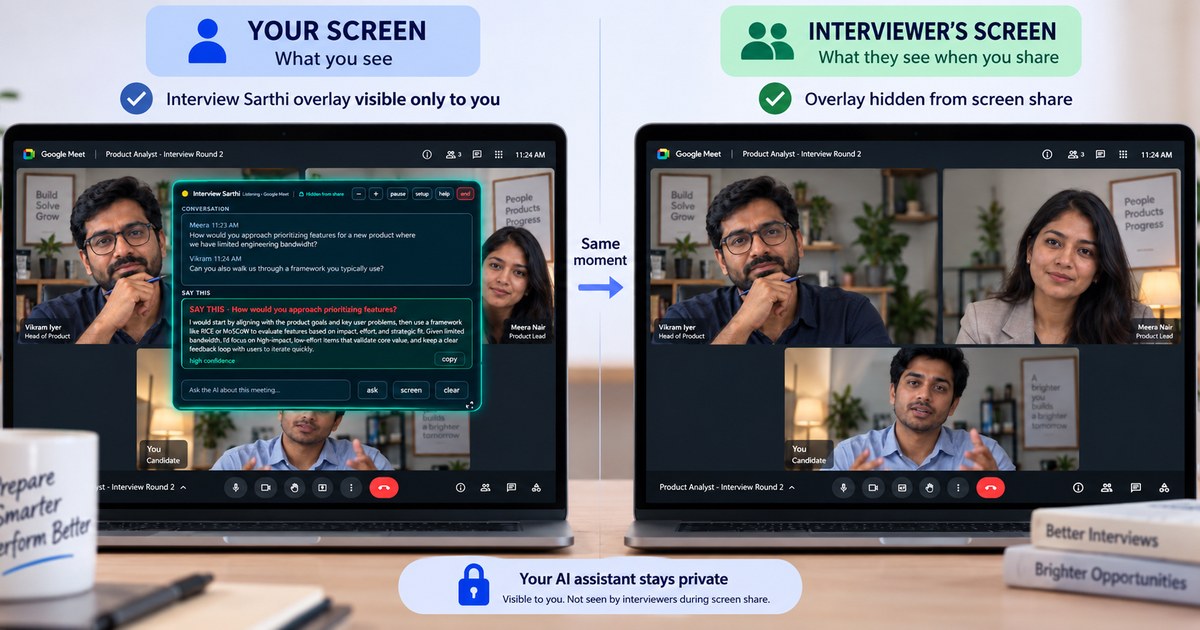
The app requires Windows and an internet connection to Google. It does not include an autonomous mock interviewer or resume builder. The overlay is hidden from supported screen capture on Windows 10 (2004+) and 11. Check your meeting setup; this does not cover every recording method. Hiding the panel from screen sharing does not establish permission to use assistance.
Best: wired earphones, or the laptop's own speaker and mic, in your meeting app. Bluetooth earphones? Disconnect them, and use wired earphones or the laptop's own speaker and mic in your meeting app. In Interview Sarthi, click setup and keep both sound boxes on Automatic.
Got a one-word or half answer? Someone spoke while the app was answering. Ask the interviewer to repeat the question; the full answer also follows by itself. Sound stops during a call? In Interview Sarthi, click more, then reconnect. Keep your meeting open. Open Interview Sarthi once; clicking its icon again brings the same window forward. The message box grows to fit its text; drag the small grip below it to change its height, or double-click the grip to let it grow automatically again.
Test before your interview: open Interview Sarthi once, put on earphones and open the AI interviewer. Add your resume and press Start. When the interviewer asks a question, check that a suggested answer appears in Interview Sarthi. Best: wired earphones, or the laptop's own speaker and mic. Bluetooth earphones? Disconnect them. Testing alone with the practice page or a phone? Answer when it asks; if the interviewer talks over an answer, the full answer follows in a moment. If you test from your phone instead, keep the phone away from the laptop, or the app hears you twice. Ask interview questions in English or Hindi. Setup and troubleshooting help.
Audio, your own words from the mic, resume context and any job description or examples you paste go from your PC to Google under your key; transcripts are stored locally, and reach us only as text if you choose to share an interview for the free report. The website uses analytics separately from the desktop app. See the privacy policy for the data flows and provider terms.
Use AI assistance only where your employer, interviewer or assessment provider permits it. For preparation, practise in a mock call and review suggestions against your own experience. Read the interview rules guide.
Interview Sarthi publishes its own comparisons. Source checks identify official pages and the date reviewed; they do not imply independent testing. Unverified claims are omitted or labelled. Statistics distinguish the source population, year and measured outcome. We publish benchmark findings only when real measurements and a reproducible method are available.
Send corrections with source links to support@interviewsarthi.com. No customer counts, ratings or performance rankings are asserted on this page.