Live Sarthi · Windows app · works with Teams, Zoom, Meet & more

Your AI interview assistant and copilot.
Stays hidden from your interviewer’s screen.

Get answers based on your resume, written as scripts you can read aloud. Answers start appearing in about 1.5 seconds. You see the assistant while it stays hidden from supported screen sharing on Windows.

Thank you! Your pass is active

This is your license key (also in your receipt email):
  1. Download and install Interview Sarthi below.
  2. Open it, paste this key on the license screen, click Activate.
30 minutes free · no card · no signup · runs on your own free Google Gemini key
Installs with no security warning and updates itself. Prefer the installer? Download the .exe.
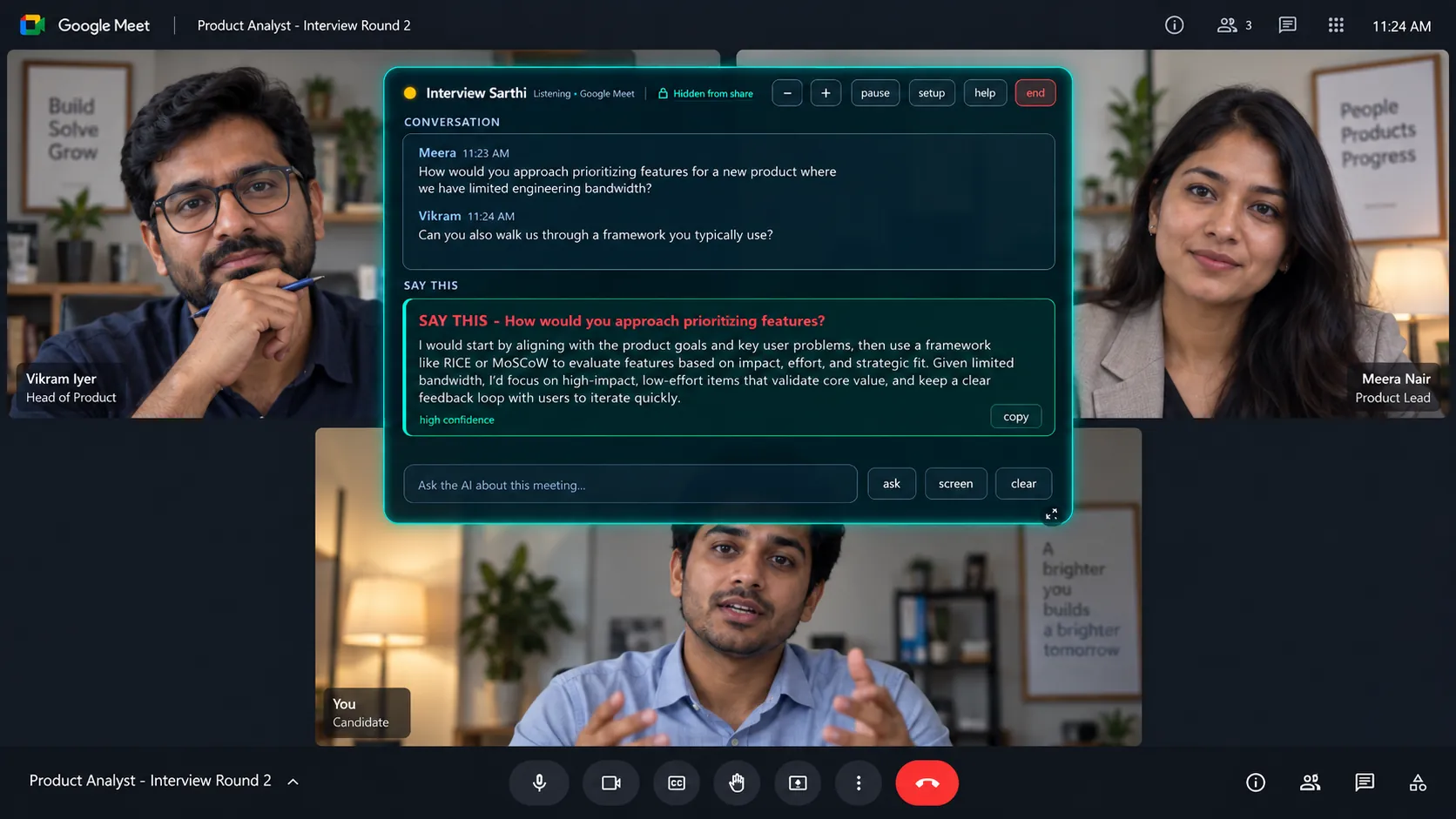
A Google Meet interview round with the Interview Sarthi panel over it: the interviewers' questions in a conversation list, and a suggested answer marked Say this with a copy button.
Vikram IyerHead of Product
Meera NairProduct Lead
YouCandidate

Your screen while they talk. The panel stays beside your call and is hidden from supported screen sharing. See the capture example →

~1.5sanswer starts appearing
3languages: English · Hindi · Hinglish
₹0AI cost within Google’s free-tier limits
0subscriptions: nothing auto-renews

It listens to your computer’s own audio, so the app on screen makes no difference. No bot ever joins the call.
Pricing

Your job hunt ends. So does the billing.

Pay once. Use it for a fixed number of days. Nothing renews, nothing is charged again.

Which one? One interview tomorrow: 2-Day. Several rounds or several companies this month: 1-Month.

Free

₹0
30 minutes free · all features · no card
  • Try it in a real call
  • Invisible in screen share, Hinglish, screen reading
  • After 30 minutes the answers stop. Buy a pass to continue.
Get it free

2-Day Pass

₹99 one-time
2 days · ₹50 a day · 1 device · UPI
  • For an interview tomorrow
  • Unlimited use for 2 days
  • 2 full days of access, with no automatic renewal.
Buy 2-Day Pass
Best value

1-Month Pass

₹299 one-time
30 days · ₹10 a day · 2 devices
  • Interviews at many companies
  • Use on a laptop and a home PC
  • 30 days of access on 2 devices
Buy 1-Month Pass

Prices for India · Outside India? See prices in $

First pass: 7-day money-back, no questions asked. Nothing renews. Nothing is charged again. The AI uses your own Gemini key. Free-tier limits and any paid Google usage are separate.

Not sure which pass, or whether it works on your setup? Ask before you pay: support@interviewsarthi.com, answered the same day by the person who built it.

Secure checkout by Cashfree · UPI (GPay / PhonePe / Paytm) · Cards · Netbanking · 7-day money-back on your first pass · policy

Stays hidden

They see your screen. Not your sarthi.

Live Sarthi uses Windows capture exclusion to hide its panel from supported screen sharing on Windows 10 (2004+) and Windows 11. The result depends on the capture method and your setup. See how capture exclusion works and test both screens before the interview.

  • No bot joins your call: it listens to your computer's own audio. No extra participant, nothing in the guest list, nothing for the interviewer to notice.
  • Hidden from supported screen share: in a full-screen or window share from Windows 10 (2004+) or 11, the overlay stays hidden in compatible setups with Teams, Zoom, Google Meet and other call apps.
  • Supported meeting recordings: when recording uses the same supported capture method, the panel is excluded. Check your recording settings.
  • Silent: it reads, never speaks. No audio goes into the call. Your mic never triggers an answer.
  • Fades to almost nothing: drag it anywhere, dim it with one key, keep it at the edge of your eye.
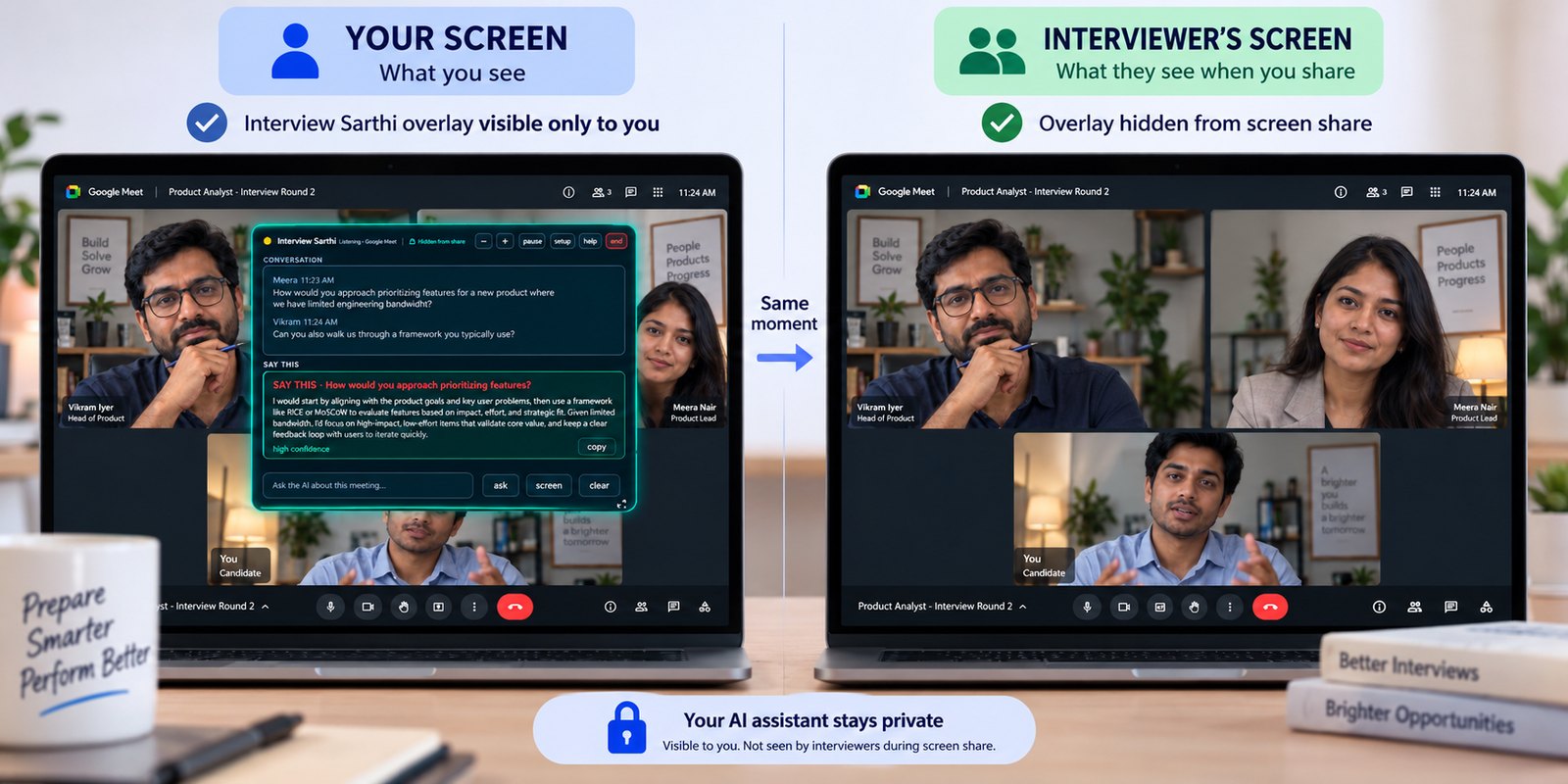
Two laptops at the same moment of a Google Meet interview: the candidate's screen shows the Interview Sarthi panel with a suggested answer; the interviewer's screen shows only the call.
The same moment, both sides. Left, your screen with the panel. Right, what the interviewer's share carries. Illustration; the real captures are below.

The same moment, from both sides.

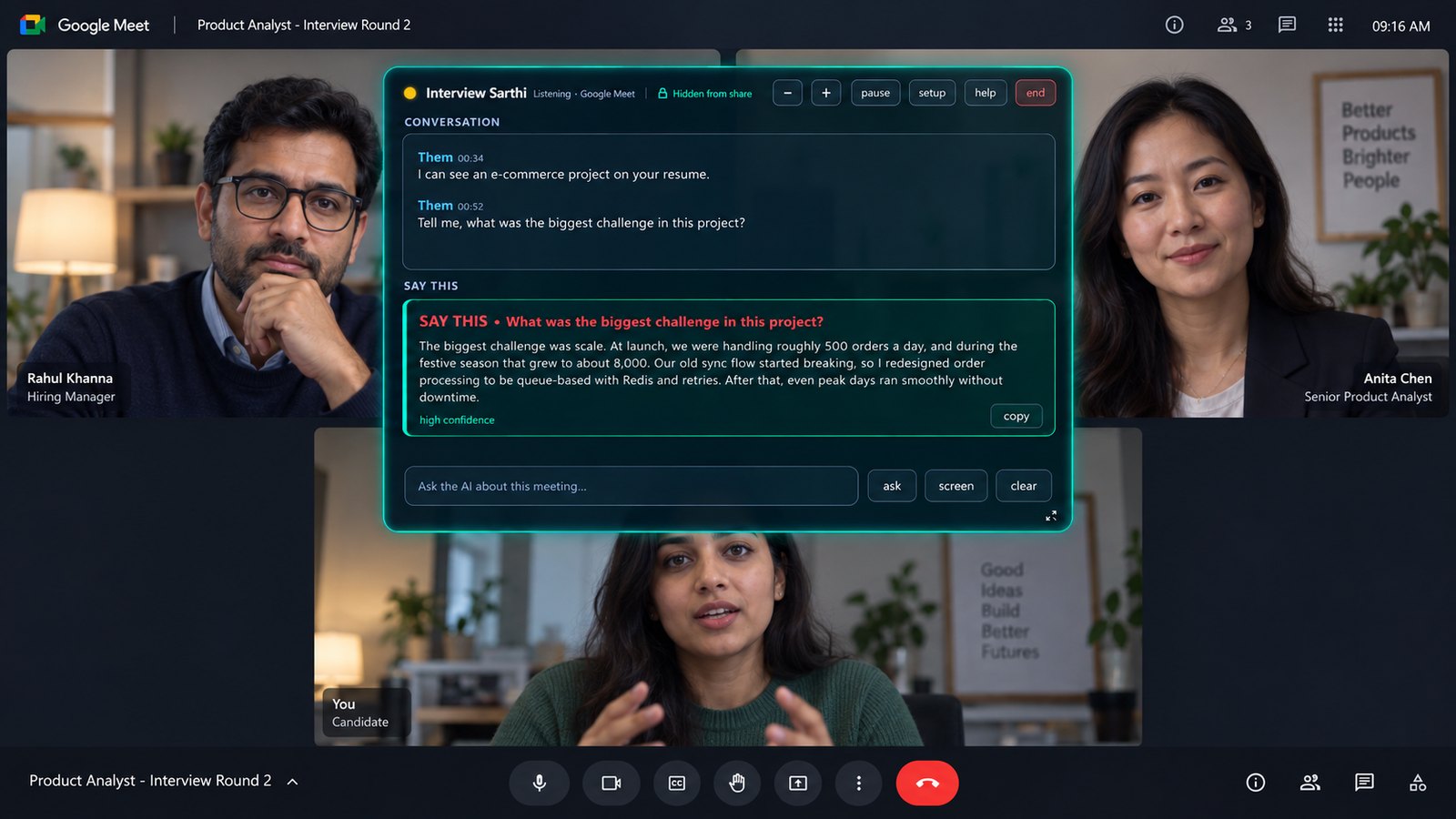
One frame of a real session. Switch between what you see and what the interviewer's stream actually carries.

A Google Meet interview with the Interview Sarthi panel over it: the panel shows the live transcript of two questions from the interviewers and a drafted spoken answer marked high confidence.
Your screen. The panel followed both questions as they were asked, and had a spoken-style answer ready before you opened your mouth.

Twenty-four seconds, start to finish.

The languages, the live transcript, what the interviewer's share carries, and the free 30 minutes.

Rendered promo. The people and rooms are illustrations. Real captures of both screens are above. Sound is on the speaker button.

Why Interview Sarthi

Choose access that fits your interview schedule.

Pay once for 2 or 30 days. Each pass includes all app features and ends without automatic renewal. You supply your own Google Gemini key; provider quotas and any paid API usage are separate.

Interview Sarthi access options
PlanOne-time priceAccessDevices
2-Day₹992 days1
1-Month₹29930 days2

Choosing between tools? See our comparison with official pricing sources, or read what an AI interview assistant does.

What you get

Not generic answers. Yours.

Tuned on hour-long Hinglish technical rounds. Made in India for Indian interviews, and it works anywhere.

Live transcript

Who said what, as it happens. A three-part question never gets lost.

Answers in seconds

A spoken-style answer appears the moment the question ends: concise, first person, key phrases in bold.

Reads the shared screen

Coding question or MCQ on their screen? One key reads it, gives the answer and a two-line explanation.

Hindi · English · Hinglish

Hears the mix Indian interviews are actually in, and answers in the same register.

Answers based on your CV

Answer suggestions use the experience in your CV. Review them before speaking: AI can still misunderstand a question or make a mistake.

Private by design

Your interview audio and CV context go from your PC to Google under your own key. Licensing and purchase details are handled separately. See what is stored and where.

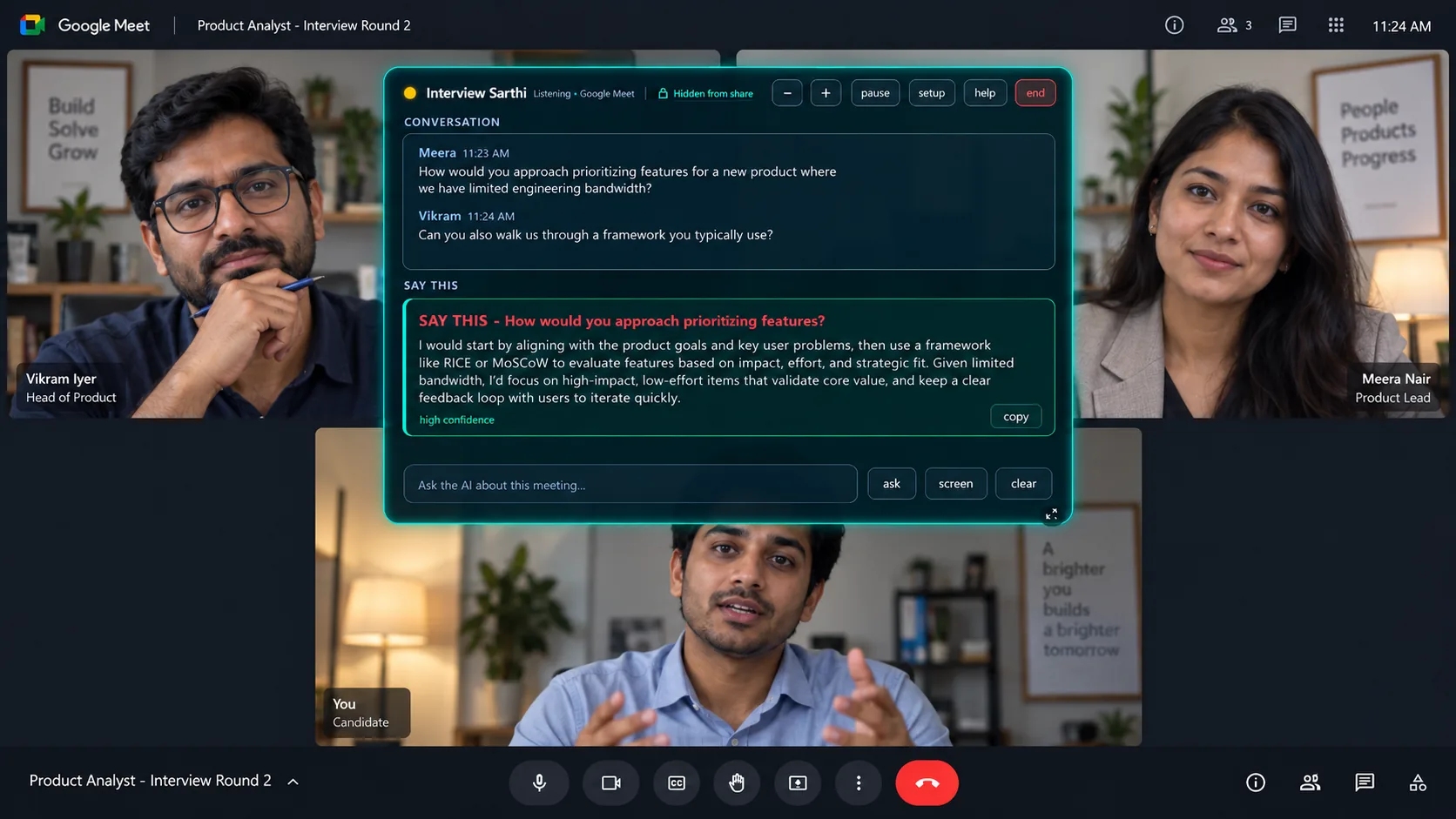
A Google Meet interview round with the Interview Sarthi panel over it: the interviewer's questions in a conversation list, and a suggested answer marked Say this with a copy button.
Mid-round, on your screen. The interviewer's words arrive in the conversation list; the suggested answer sits under "Say this" with a copy button. Illustration; the real captures are above.

How it works

Two minutes of setup. Then just join the call.

No account with us, no card, no credit system. Your own free Google key powers the AI.

Add your free key

One button opens Google AI Studio. Create a key, paste it, press Test, see the green tick. No credit card anywhere.

Upload your resume

PDF, Word or a scan. It fills in your name and field, and every answer about “your experience” uses your real projects.

Join the call

The overlay hears the interviewer, shows what was asked, and drafts what to say, in seconds, in the language they used.

Installing

Using the .exe? Windows will warn you once.

Install from the Microsoft Store and you never see this screen, and the app keeps itself updated. The direct .exe is not code-signed, so Windows shows this warning for any app it has not seen before. We would rather you meet it here than cold.

1

Windows protected your PC

Microsoft Defender SmartScreen prevented an unrecognized app from starting. Running this app might put your PC at risk.

More info
Don't run

Click “More info”. This screen offers only Don't run, the button you actually need is hidden behind that link. This is where most people give up.

2

Windows protected your PC

App: Interview-Sarthi-Setup.exe
Publisher: Unknown publisher

Run anywayDon't run

Click “Run anyway”. The installer opens. Choose Install for me only , no administrator password needed, and it is done in about a minute.

“Unknown publisher” means nothing was detected. It means we have not bought a code-signing certificate, which is a paperwork-and-money problem rather than a safety one. If you would rather check first, upload the installer to VirusTotal and scan it with 70+ engines before you run it. The install is per-user and never asks for admin rights.

Three tools, one job hunt

Choose Apply for jobs, Prep for practice, and Live for permitted help during a call. Live and a Prep pass use your Gemini key (Prep's free demo needs none); Google’s model and project limits apply.

1. Find the job

ApplySarthi. Jobs from Naukri, LinkedIn, Indeed and 750+ company career pages, ranked against your CV, with the application form filled in for you to check and submit.

How ApplySarthi works →

2. Practise the interview

Prep Sarthi. An AI interviewer reads your CV and asks about your own projects out loud, follows up when an answer is thin, then scores every answer. In your browser, with a free 7-minute demo.

Practise a mock interview →

3. Walk into the real one

Interview Sarthi. On the live call it hears the question and drafts your answer from your resume, in English, Hindi or Hinglish, on an overlay screen share cannot see. You are here.

See the passes →

FAQ

Questions people ask before buying

Can the interviewer see it?

The panel is hidden from supported screen sharing on Windows 10 (2004+) and Windows 11. Capture methods and recording settings vary, so test your own setup first. A hidden panel does not establish whether assistance is allowed in your interview.

Why does Windows say “unknown publisher”?

Only on the direct .exe, because it is not code-signed. It is not a detection of anything. The simplest fix is to install from the Microsoft Store instead, where the warning never appears. On the .exe, click More info then Run anyway; the full walkthrough with screenshots is further up this page. You can scan the file on VirusTotal first if you prefer.

Do I need to pay for the AI separately?

You supply your own Gemini API key. Eligible models have a free tier, subject to Google quotas and availability. If you enable paid API use, Google charges separately from your software pass. Check your limits before a mock call.

How are software access and AI usage priced?

The software pass and AI usage are separate. You buy a fixed-duration pass and use your own Gemini key. Compare the total cost, platform and usage limits before choosing a tool.

Does it work for my field, or only for developers?

Any field. It reads your resume, works out your field and its vocabulary, and tunes the listener to it, marketing, finance, nursing, sales, mechanical, teaching. Coding-round features are a bonus for developers.

Hindi and Hinglish?

Yes. It hears the mix and answers in the same register, in Latin-script Hinglish so you can read it fast.

I have just one interview coming up, which pass?

If it is one call, the 2-Day Pass (₹99). But most interviews have 2 or 3 rounds on different days. The 1-Month Pass (₹299) covers all of them, and any other company you interview with this month, with unlimited use. If you expect a second round, buy the month.

What exactly is free?

30 minutes, with every feature on: hidden overlay, Hinglish, screen reading. Use it in one call or two. When the 30 minutes end, the app does not close. You still see what the interviewer says; only the answers stop. Paste a pass key in the same window and the answers come back. The free minutes are per computer and do not come back if you reinstall.

What if it does not work for me?

Your first pass has a 7-day money-back guarantee, no questions asked. Email support@interviewsarthi.com from the address you paid with, and you get the full amount back. Refund policy.

What happens when my pass ends?

The app shows a renew screen. Buy a new pass, paste the new key, continue. Nothing auto-charges, ever.

Which systems?

Windows 10 (2004) and 11. Any call app that plays through your speakers. Use headphones so your own voice does not leak into the microphone channel.

Is my data safe?

Interview audio and CV context go from your PC to Google using your Gemini key. Transcripts are stored locally; licensing and purchase records are handled by our services. Read the privacy policy for details.

The Interview Sarthi mascot: a friendly robot holding a tablet

Arjuna had a charioteer

You knew the answer. You just needed a second.

Install in a minute. Try 30 minutes free. Buy a pass only if it helped.